

Description
Download Zoho CRM – CRM, Sales, Marketing, Customer Support, Inventory Management
Overview
Zoho CRM is a comprehensive customer relationship management platform designed to streamline the entire customer lifecycle across sales, marketing, customer support, and inventory management. Built for organizations of all sizes, it provides a unified system that centralizes customer interactions, enabling teams to work more efficiently and make data-driven decisions. The software is particularly beneficial for small to medium-sized businesses seeking an integrated solution without the burden of on-premise infrastructure.
By eliminating the need for servers, expensive software licenses, or backup systems, Zoho CRM operates entirely in the cloud, offering seamless accessibility from any device with a web browser. This makes it ideal for remote teams, distributed workforces, and growing enterprises that require flexibility and scalability. The platform supports real-time collaboration, automated workflows, and centralized data storage, helping organizations maintain consistent communication with clients and improve service delivery.
Real-world applications include managing sales pipelines, tracking marketing campaign performance, resolving customer inquiries through integrated support tools, and monitoring inventory levels across multiple locations. Its modular design allows businesses to adopt only the components they need, with the ability to scale as operations expand. The developer, Zoho Corporation, is known for delivering robust, user-centric business tools that emphasize automation, integration, and affordability.
Key Features & Capabilities
- End-to-End CRM Lifecycle Management – Manage every stage of the customer journey, from lead generation to post-sales support, within a single interface.
- Automated Sales & Marketing Workflows – Align sales and marketing teams by integrating lead tracking, campaign management, pipeline forecasting, and performance analytics.
- Centralized Communication Hub – Track all customer email correspondence directly within the CRM, ensuring no interaction is missed.
- Seamless Contact Integration – Import and synchronize contacts from Gmail and Google Apps, enabling instant access to existing customer data.
- Customization via Drag-and-Drop Tools – Tailor the CRM layout, fields, and modules to match unique business processes without coding.
- Role-Based Access Control – Define user permissions based on organizational hierarchy to ensure data security and compliance.
- Integrated Inventory Management – Monitor stock levels, manage orders, and track fulfillment directly within the CRM system.
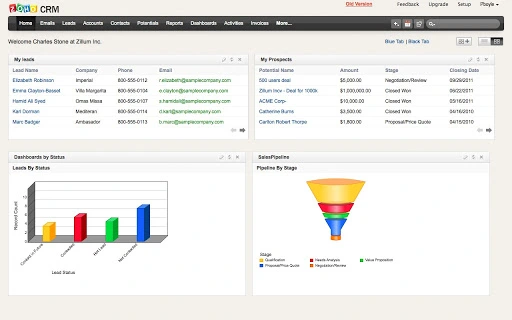
- Advanced Reporting & Dashboards – Visualize key performance metrics and trends in sales, marketing, and service operations.
- Third-Party Integrations – Connect with accounting, ERP, telephony, and project management tools using developer APIs and pre-built add-ons.
These features collectively support efficient business operations, reduce manual work, and enhance customer satisfaction. For example, a marketing team can launch a campaign, track lead conversions, and analyze ROI—all within the same platform. Similarly, a support agent can view a customer’s full history, respond via integrated email, and log a ticket without switching applications.
User Interface, Workflow & Performance
The user interface of Zoho CRM is designed for clarity and efficiency, featuring a clean, modern layout with intuitive navigation. Users can access core modules through a customizable dashboard, with quick links to frequently used functions. The drag-and-drop customization tools allow teams to reorganize fields, layouts, and workflows without technical expertise.
Navigation is consistent across platforms, offering a similar experience whether accessed via Windows, Mac, Linux, or web browsers. The workflow is streamlined, with minimal steps required to create records, update statuses, or generate reports. Tasks such as importing contacts, setting up automation rules, or building dashboards are guided through step-by-step wizards, reducing the learning curve for new users.
Performance is generally stable, with responsive interactions across devices. The developer did not specify resource usage details, but cloud-based operation ensures that local system performance is not heavily impacted. Users can expect fast load times and smooth transitions, especially when working with moderate data volumes. Stability is maintained through regular backend updates and automated maintenance by Zoho Corporation.
Compatibility & System Requirements
Zoho CRM is compatible with Windows, Mac, and Linux operating systems, and is also accessible via web browsers on any device. This cross-platform availability ensures broad accessibility for teams using diverse hardware and software environments. The software is delivered as a cloud-hosted application, meaning no local installation is required on the user’s machine.
The installation size is listed as 150 MB, though this may refer to the downloadable client component or cache data rather than a traditional desktop installer. The developer did not specify exact system requirements, such as minimum RAM, CPU, or storage needs. However, since the application runs primarily in the browser, performance is largely dependent on internet connectivity and the capabilities of the host device.
Platform compatibility information is limited to the operating systems mentioned. No additional hardware or software prerequisites were provided. Users are advised to ensure a stable internet connection for optimal performance, especially when using advanced features like real-time reporting or video conferencing integrations.
Pros and Cons
Pros
- Cloud-based deployment eliminates server and backup needs
- Free version available for up to 3 users
- Extensive customization options via drag-and-drop interface
- Strong integration with Google Apps and Gmail
- Comprehensive suite covering sales, marketing, support, and inventory
- Scalable pricing with pay-as-you-go model
- Real-time collaboration and data synchronization
- Regular updates and feature enhancements
Cons
- No offline mode available for desktop use
- Advanced features may require technical knowledge for full implementation
- Performance depends on internet speed and reliability
- Customization can become complex in large organizations
- Learning curve for users unfamiliar with CRM systems
- Limited support for legacy operating systems
FAQ Section
Is Zoho CRM compatible with Windows, Mac, and Linux?
Yes, Zoho CRM is compatible with Windows, Mac, and Linux operating systems. It can be accessed via web browsers on any device, making it suitable for users across different platforms.
Is Zoho CRM safe to use?
Yes, Zoho CRM is designed with security in mind. Data is hosted in secure data centers, and the platform includes role-based access controls and encryption to protect sensitive information.
How often does Zoho CRM receive updates?
Zoho Corporation regularly releases updates to improve functionality, fix bugs, and enhance security. Users benefit from automatic updates without needing to manually install new versions.
What type of license does Zoho CRM use?
Zoho CRM offers a freemium model. The free version supports up to 3 users, while paid editions are available on a per-user, per-month basis with no long-term contracts.
Can I use Zoho CRM without an internet connection?
While Zoho CRM is primarily a cloud-based application, it does not currently offer an offline mode for desktop use. A stable internet connection is required to access and use the software.
Final Thoughts + CTA
Zoho CRM stands out as a powerful, all-in-one solution for businesses aiming to unify their sales, marketing, support, and inventory operations. Its cloud-native architecture, intuitive interface, and extensive feature set make it a compelling choice for growing organizations across industries. The ability to customize workflows, integrate with third-party tools, and scale seamlessly adds significant value.
While the lack of offline functionality and a moderate learning curve may present challenges for some users, the benefits far outweigh the limitations. The free version offers a solid foundation for small teams, while the paid tiers provide enterprise-grade capabilities without long-term commitments.
For businesses seeking a secure, scalable, and feature-rich CRM platform that simplifies customer management and drives growth, Zoho CRM delivers on its promise. Download Zoho CRM now to experience a complete business solution in one place.
Guides & Tutorials for Zoho CRM App for Chrome
How to install Zoho CRM App for Chrome
- Click the Preview / Download button above.
- Once redirected, accept the terms and click Install.
- Wait for the Zoho CRM App for Chrome download to finish on your device.
How to use Zoho CRM App for Chrome
This software is primarily used for its core features described above. Open the app after installation to explore its capabilities.
User Reviews for Zoho CRM App for Chrome 0
No reviews found





